Monk Took Book Controls
Keyboard, mouse, controller, Steam Deck, rebinds, holster, and library verbs.
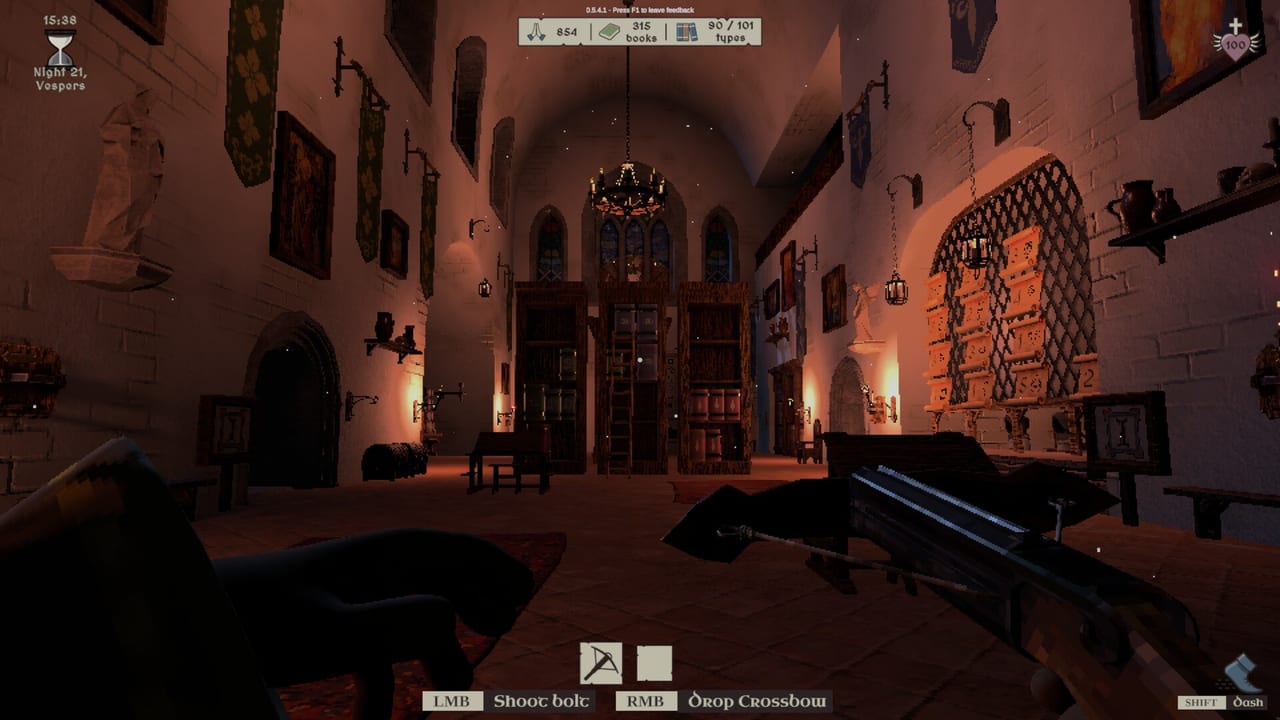
Monk Took Book is a hands game. You haul stacks, seat covers, ring a bell, and sometimes parry a Draugr in the same minute. SquarePlay Games shipped full key rebinding, HUD prompts that update when you rebind during play, first and third person, controller menu navigation, and Steam Deck support that is meant to run without a mouse. If a prompt on screen disagrees with this page, trust the HUD: the client is English-only and it will name the current bind. This page records the verbs the wiki actually needs so Getting Started and How to Play can talk about the job instead of the keyboard.
Read settings before you host. Sensitivity, headbob, FoV, gamma, window versus fullscreen, and the Auto Run toggle all sit there with the combat sliders. A library night is a bad time to discover your look speed is a weapon.
Keyboard and mouse
Movement is the usual PC set, but the library verbs are the ones that wreck a night when they are wrong. Left mouse shoots a crossbow bolt or performs an exorcism with the holy cross, depending on what is in hand. Right mouse drops the item you are holding; it is also part of placing books. Control blocks. Shift is Run (it was named Dash in earlier builds). You can toggle Auto Run in the menu if holding Shift fights your hands.
Placing books is interact plus right mouse, matching demo videos. Watch the placement indicator: valid seats read clearly, bad overlap is how you create a volume you will never retrieve. Hold Z to sell shelves you regret. That is an economy bind, not a panic bind; selling a bay mid-checkout because you mashed a key is how the taxonomy dies. Press a hotbar slot key again to holster whatever lives there. Opening night with a lit torch because you could not put it away is how embers happen.
Throwing books is legal and useful: to a brother, across a gap, or into a face. Dropping with right mouse is not the same as a throw. Learn both before you try to supply a scribe from a loft. Text chat is Y. F1 opens in-game feedback, which is for SquarePlay, not for arguing with the Book Thief. Some builds toggle first and third person with V; if V does nothing, look at the current rebind list rather than assuming the wiki is a ROM hack.
Controller and Steam Deck
Controller support includes Xbox layouts and d-pad menu navigation rather than a mouse-only virtual cursor. Left stick can still summon a virtual cursor when a slider needs it. HUD prompts swap when you pick up a pad. If you rebind on a pad, glance at the HUD before you enter the belfry; the prompt you memorised on mouse will lie.
Steam Deck is a supported way to run the job, not a rumour. Menus are meant to be usable on the handheld. Sensitivity still matters more here than on a desk: lower it until you can seat a half-book without painting the bay. Auto Run helps on thumbsticks when a dock-to-hall commute is the whole day shift. Gyro is not a promise this wiki will make; use what the current build exposes and rebind the rest.
Co-op on a pad needs extra discipline. Proximity voice does not care that you are on a Deck. Public and private lobbies, Steam invites, and copy/paste join codes all still work. If you are the host, confirm system requirements on the PC in the room before you invite a Deck monk into a four-player night that already runs at about 55 percent of solo time. Co-op is the staffing page; this page is why the shelf priest should not also be the person who cannot holster a torch.
Camera, hotbar, holster, and library verbs
First person is for seating and for reading covers. Third person is for carrying a stack up stairs without kissing a doorframe. Switch when the job changes, not once per save. Headbob and FoV sliders exist because a nauseous librarian misses checkout. Invert Y is a one-time decision; the client has had to prevent double-selecting it, which tells you how often people mash it by accident.
Hotbar is tools and weapons, not a second library. Dagger, crossbow (bolts; fire arrows can ember), holy cross, torch, bucket or pail, quill, small ladder, large ladder: that is the job site. Holster by pressing the slot again. A holstered torch cannot kiss a chonky volume. A drawn holy cross is for the Green Abbot, not for pointing at the tapestry. Perfect Parry dazes if you block at the right time; Control is the block bind on keyboard until you say otherwise.
Library-specific verbs deserve a dry run in daylight. Place books on a bay you can later see from the checkout desk. Throw only when a brother is looking or when a pest needs a hardcover. Sell shelves with a held Z after you have moved the stock, not before. Ring the belfry as a deliberate world interact, not as a combat overflow. If you cannot remember which key rings, reads, or seats, you are not ready for How to Organize Books; you are ready for a rebind session.
Chat, feedback, and a pre-bell checklist
Y opens text chat. Use it to publish the taxonomy: animals left, food loft, shapes at desk height. Proximity voice is spatial; shouting from the crypt does not reach the dock. F1 is the in-game feedback tool. Steam Cloud keeps the save. There are 52 achievements. None of those systems will seat a book for you.
Before you ring, run a hands checklist that has nothing to do with Blessings. Holster the torch unless you like embers. Equip a bucket if the last night left scorch marks. Put the quill where you can find it without opening the whole bar. Confirm you are not still in a sell-shelf hold. Confirm the party knows who rings; two bells is how How to Play turns into a ledger with no payday. Solo monks can skip the argument and still should holster.
Rebind anything that fights the job. The HUD will follow. Then go back to the Guides Hub and do the work: haul, seat, ring, fetch. Controls are correct when you can finish checkout without looking at this page, and when the only surprise on the hotbar is a tool you meant to draw.
Frequently Asked Questions
Quick answers for novices tending the Holy Island library.
Can I rebind Monk Took Book controls?
Yes. Full rebinding is in the client, and HUD prompts update when you change a bind during play. Confirm the new prompt before you ring the belfry.
How do I holster a tool or weapon?
Press the same hotbar slot key again. Holster torches before checkout so embers do not start in a dry bay.
How do I switch first and third person?
Some builds toggle with V. If that key does nothing, read the current rebind list and settings rather than forcing a stale default.
How do I sell a shelf?
Hold Z after you have moved the books off it. Selling is for rebuilding a taxonomy, not for panicking mid-order.
Does Steam Deck work?
Steam lists Deck as Playable, not Verified. See Steam Deck and controller for d-pad menus, auto-run, and hosting notes. Lower sensitivity until half-books seat cleanly.
How do I talk in a lobby?
Proximity voice is spatial. Text chat is Y. Publish the shelf rule in chat so co-op is not four silent taxonomies.